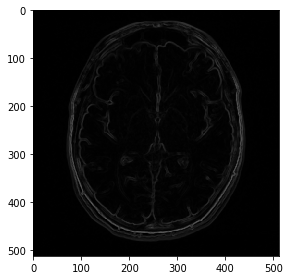
Creating a Segmentation App with MONAI Deploy App SDK
~This tutorial shows how to develop a simple image processing application can be created with MONAI Deploy App SDK.~
Creating Operators and connecting them in Application class
We will implement an application that consists of five Operators:
DICOMDataLoaderOperator:
Input(dicom_files): a file path (
DataPath)Output(dicom_study_list): a list of DICOM studies in memory (List[
DICOMStudy])
DICOMSeriesSelectorOperator:
Input(dicom_study_list): a list of DICOM studies in memory (List[
DICOMStudy])Input(selection_rules): a selection rule (Dict)
Output(dicom_series): a DICOM series object in memory (
DICOMSeries)
DICOMSeriesToVolumeOperator:
Input(dicom_series): a DICOM series object in memory (
DICOMSeries)Output(image): an image object in memory (
Image)
SpleenSegOperator:
DICOMSegmentationWriterOperator:
Input(seg_image): a segmentation image object in memory (
Image)Input(dicom_series): a DICOM series object in memory (
DICOMSeries)Output(dicom_seg_instance): a file path (
DataPath)
The workflow of the application would look like this.
Setup environment
# Install necessary image loading/processing packages for the application
!python -c "import PIL" || pip install -q "Pillow"
!python -c "import skimage" || pip install -q "scikit-image"

# Install MONAI Deploy App SDK package
!python -c "import monai.deploy" || pip install -q "monai-deploy-app-sdk"
Download test input
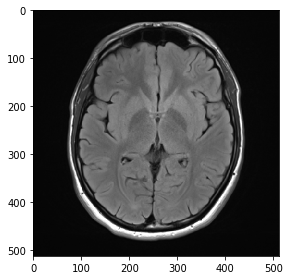
We will use a test input from the following.
Case courtesy of Dr Bruno Di Muzio, Radiopaedia.org. From the case rID: 41113
!python -c "import wget" || pip install -q "wget"

from skimage import io
import wget

test_input_path = "/tmp/normal-brain-mri-4.png"
wget.download("https://user-images.githubusercontent.com/1928522/133383228-2357d62d-316c-46ad-af8a-359b56f25c87.png", test_input_path)

print(f"Test input file path: {test_input_path}")

test_image = io.imread(test_input_path)
io.imshow(test_image)
Test input file path: /tmp/normal-brain-mri-4.png
<matplotlib.image.AxesImage at 0x7f0644cacd30>
Setup imports
Let’s import necessary classes/decorators to define Application and Operator.
from monai.deploy.core import (
    Application,
    DataPath,
    env,
    ExecutionContext,
    Image,
    InputContext,
    IOType,
    Operator,
    OutputContext,
    input,
    output,
    resource,
)
Creating Operator classes
Each Operator class inherits Operator class and input/output properties are specified by using @input/@output decorators.
Note that the first operator(SobelOperator)’s input and the last operator(GaussianOperator)’s output are DataPath type with IOType.DISK. Those paths are mapped into input and output paths given by the user during the execution.
Business logic would be implemented in the compute() method.
SobelOperator
SobelOperator is the first operator (A root operator in the workflow graph). input.get(label) (since only one input is defined in this operator, we don’t need to specify an input label) would return an object of DataPath and the input file/folder path would be available by accessing the path property (input.get().path).
Once an image data (as a Numpy array) is loaded and processed, Image object is created from the image data and set to the output (output.set(value, label)).
@input("image", DataPath, IOType.DISK)
@output("image", Image, IOType.IN_MEMORY)
# If `pip_packages` is specified, the definition will be aggregated with the package dependency list of other
# operators and the application in packaging time.
# @env(pip_packages=["scikit-image >= 0.17.2"])
class SobelOperator(Operator):
    """This Operator implements a Sobel edge detector.

    It has a single input and single output.
    """

    def compute(self, input: InputContext, output: OutputContext, context: ExecutionContext):
        from skimage import filters, io

        input_path = input.get().path

        data_in = io.imread(input_path)[:, :, :3]  # discard alpha channel if exists
        data_out = filters.sobel(data_in)

        output.set(Image(data_out))
MedianOperator
MedianOperator is a middle operator that accepts data from SobelOperator and pass the processed image data to GaussianOperator.
Its input and output data types are Image and the Numpy array data is available through asnumpy() method (input.get().asnumpy()).
Again, once an image data (as a Numpy array) is loaded and processed, Image object is created and set to the output (output.set(value, label)).
@input("image", Image, IOType.IN_MEMORY)
@output("image", Image, IOType.IN_MEMORY)
# If `pip_packages` is specified, the definition will be aggregated with the package dependency list of other
# operators and the application in packaging time.
# @env(pip_packages=["scikit-image >= 0.17.2"])
class MedianOperator(Operator):
    """This Operator implements a noise reduction.

    The algorithm is based on the median operator.
    It ingests a single input and provides a single output.
    """

    def compute(self, input: InputContext, output: OutputContext, context: ExecutionContext):
        from skimage.filters import median

        data_in = input.get().asnumpy()
        data_out = median(data_in)
        output.set(Image(data_out))
GaussianOperator
GaussianOperator is the last operator (A leaf operator in the workflow graph) and the output path of this operator is mapped to the user-provided output folder so we cannot set a path to output variable (e.g., output.set(Image(data_out))).
Instead, we can get the output path through output.get().path and save the processed image data into a file.
@input("image", Image, IOType.IN_MEMORY)
@output("image", DataPath, IOType.DISK)
# If `pip_packages` is specified, the definition will be aggregated with the package dependency list of other
# operators and the application in packaging time.
# @env(pip_packages=["scikit-image >= 0.17.2"])
class GaussianOperator(Operator):
    """This Operator implements a smoothening based on Gaussian.

    It ingests a single input and provides a single output.
    """

    def compute(self, input: InputContext, output: OutputContext, context: ExecutionContext):
        from skimage.filters import gaussian
        from skimage.io import imsave

        data_in = input.get().asnumpy()
        data_out = gaussian(data_in, sigma=0.2)

        output_folder = output.get().path
        output_path = output_folder / "final_output.png"
        imsave(output_path, data_out)
Creating Application class
Our application class would look like below.
It defines App class, inheriting Application class.
The requirements (resource and package dependency) for the App can be specified by using @resource and @env decorators.
@resource(cpu=1)
# pip_packages can be a string that is a path(str) to requirements.txt file or a list of packages.
@env(pip_packages=["scikit-image >= 0.17.2"])
class App(Application):
    """This is a very basic application.

    This showcases the MONAI Deploy application framework.
    """

    # App's name. <class name>('App') if not specified.
    name = "simple_imaging_app"
    # App's description. <class docstring> if not specified.
    description = "This is a very simple application."
    # App's version. <git version tag> or '0.0.0' if not specified.
    version = "0.1.0"

    def compose(self):
        """This application has three operators.

        Each operator has a single input and a single output port.
        Each operator performs some kind of image processing function.
        """
        sobel_op = SobelOperator()
        median_op = MedianOperator()
        gaussian_op = GaussianOperator()

        self.add_flow(sobel_op, median_op)
        # self.add_flow(sobel_op, median_op, {"image": "image"})
        # self.add_flow(sobel_op, median_op, {"image": {"image"}})

        self.add_flow(median_op, gaussian_op)
In compose() method, objects of SobelOperator, MedianOperator, and GaussianOperator classes are created
and connected through self.add_flow().
add_flow(upstream_op, downstream_op, io_map=None)
io_map is a dictionary of mapping from the source operator’s label to the destination operator’s label(s) and its type is Dict[str, str|Set[str]].
We can skip specifying io_map if both the number of upstream_op’s outputs and the number of downstream_op’s inputs are one so self.add_flow(sobel_op, median_op) is same with self.add_flow(sobel_op, median_op, {"image": "image"}) or self.add_flow(sobel_op, median_op, {"image": {"image"}}).
Executing app locally
We can execute the app in the Jupyter notebook.
app = App()
app.run(input=test_input_path, output="output")
Going to initiate execution of operator SobelOperator
Executing operator SobelOperator (Process ID: 22697, Operator ID: 6322e393-bf13-474e-b40e-85ff1171154d)
Done performing execution of operator SobelOperator

Going to initiate execution of operator MedianOperator
Executing operator MedianOperator (Process ID: 22697, Operator ID: d60e65bf-1c31-4cad-8945-22e0fb9290f7)
Done performing execution of operator MedianOperator

Going to initiate execution of operator GaussianOperator
Executing operator GaussianOperator (Process ID: 22697, Operator ID: f5805c3c-e05c-4716-bea1-1c29293b82b9)
Images with dimensions (M, N, 3) are interpreted as 2D+RGB by default. Use `multichannel=False` to interpret as 3D image with last dimension of length 3.
[2021-09-15 00:51:35,761] [WARNING] (imageio) - Lossy conversion from float64 to uint8. Range [0, 1]. Convert image to uint8 prior to saving to suppress this warning.
Done performing execution of operator GaussianOperator
!ls output
final_output.png
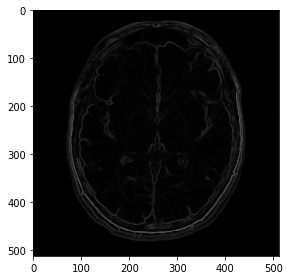
output_image = io.imread("output/final_output.png")
io.imshow(output_image)
<matplotlib.image.AxesImage at 0x7f06425db7f0>
Once the application is verified inside Jupyter notebook, we can write the above Python code into Python files in an application folder.
The application folder structure would look like below:
simple_imaging_app
├── __main__.py
├── app.py
├── gaussian_operator.py
├── median_operator.py
└── sobel_operator.py
Note
We can create a single application Python file (such as simple_imaging_app.py) that includes the content of the files, instead of creating multiple files.
You will see such example in MedNist Classifier Tutorial.
# Create an application folder
!mkdir -p simple_imaging_app
sobel_operator.py
%%writefile simple_imaging_app/sobel_operator.py
from monai.deploy.core import (
    DataPath,
    ExecutionContext,
    Image,
    InputContext,
    IOType,
    Operator,
    OutputContext,
    input,
    output,
)


@input("image", DataPath, IOType.DISK)
@output("image", Image, IOType.IN_MEMORY)
class SobelOperator(Operator):
    def compute(self, input: InputContext, output: OutputContext, context: ExecutionContext):
        from skimage import filters, io

        input_path = input.get().path

        data_in = io.imread(input_path)[:, :, :3]  # discard alpha channel if exists
        data_out = filters.sobel(data_in)

        output.set(Image(data_out))
Overwriting simple_imaging_app/sobel_operator.py
median_operator.py
%%writefile simple_imaging_app/median_operator.py
from monai.deploy.core import ExecutionContext, Image, InputContext, IOType, Operator, OutputContext, input, output


@input("image", Image, IOType.IN_MEMORY)
@output("image", Image, IOType.IN_MEMORY)
class MedianOperator(Operator):
    def compute(self, input: InputContext, output: OutputContext, context: ExecutionContext):
        from skimage.filters import median

        data_in = input.get().asnumpy()
        data_out = median(data_in)
        output.set(Image(data_out))
Overwriting simple_imaging_app/median_operator.py
gaussian_operator.py
%%writefile simple_imaging_app/gaussian_operator.py
from monai.deploy.core import (
    DataPath,
    ExecutionContext,
    Image,
    InputContext,
    IOType,
    Operator,
    OutputContext,
    input,
    output,
)


@input("image", Image, IOType.IN_MEMORY)
@output("image", DataPath, IOType.DISK)
class GaussianOperator(Operator):
    def compute(self, input: InputContext, output: OutputContext, context: ExecutionContext):
        from skimage.filters import gaussian
        from skimage.io import imsave

        data_in = input.get().asnumpy()
        data_out = gaussian(data_in, sigma=0.2)

        output_folder = output.get().path
        output_path = output_folder / "final_output.png"
        imsave(output_path, data_out)
Overwriting simple_imaging_app/gaussian_operator.py
app.py
%%writefile simple_imaging_app/app.py
from gaussian_operator import GaussianOperator
from median_operator import MedianOperator
from sobel_operator import SobelOperator

from monai.deploy.core import Application, env, resource


@resource(cpu=1)
@env(pip_packages=["scikit-image >= 0.17.2"])
class App(Application):
    def compose(self):
        sobel_op = SobelOperator()
        median_op = MedianOperator()
        gaussian_op = GaussianOperator()

        self.add_flow(sobel_op, median_op)
        self.add_flow(median_op, gaussian_op)

# Run the application when this file is executed.
if __name__ == "__main__":
    App(do_run=True)
Overwriting simple_imaging_app/app.py
if __name__ == "__main__":
    App(do_run=True)
Above lines are needed to execute the application code by using python interpreter.
__main__.py
__main__.py is needed for MONAI Application Packager to detect main application code (app.py) when the application is executed with the application folder path (e.g., python simple_imaging_app).
%%writefile simple_imaging_app/__main__.py
from app import App

if __name__ == "__main__":
    App(do_run=True)
Overwriting simple_imaging_app/__main__.py
!ls simple_imaging_app
__main__.py  gaussian_operator.py  sobel_operator.py
app.py	     median_operator.py
In this time, let’s execute the app in the command line.
!python simple_imaging_app -i {test_input_path} -o output
Going to initiate execution of operator SobelOperator
Executing operator SobelOperator (Process ID: 19754, Operator ID: fa462166-f222-4f98-acfc-89c2bd1eecb5)
Done performing execution of operator SobelOperator

Going to initiate execution of operator MedianOperator
Executing operator MedianOperator (Process ID: 19754, Operator ID: 8fdb2db5-87cb-4bb5-989a-5c00d31a95c6)
Done performing execution of operator MedianOperator

Going to initiate execution of operator GaussianOperator
Executing operator GaussianOperator (Process ID: 19754, Operator ID: 42af8055-0aff-41e3-886c-a0950161c6af)
Images with dimensions (M, N, 3) are interpreted as 2D+RGB by default. Use `multichannel=False` to interpret as 3D image with last dimension of length 3.
[2021-09-15 01:06:43,150] [WARNING] (imageio) - Lossy conversion from float64 to uint8. Range [0, 1]. Convert image to uint8 prior to saving to suppress this warning.
Done performing execution of operator GaussianOperator
Above command is same with the following command line:
!monai-deploy exec simple_imaging_app -i {test_input_path} -o output
Going to initiate execution of operator SobelOperator
Executing operator SobelOperator (Process ID: 19966, Operator ID: 3fb17c0c-aa9d-46d9-8494-9ca8ae417546)
Done performing execution of operator SobelOperator

Going to initiate execution of operator MedianOperator
Executing operator MedianOperator (Process ID: 19966, Operator ID: b01b4936-daad-411c-9599-d54bdfd467fd)
Done performing execution of operator MedianOperator

Going to initiate execution of operator GaussianOperator
Executing operator GaussianOperator (Process ID: 19966, Operator ID: abdf5883-e15f-416b-abc7-d3c3049da01c)
Images with dimensions (M, N, 3) are interpreted as 2D+RGB by default. Use `multichannel=False` to interpret as 3D image with last dimension of length 3.
[2021-09-15 01:07:06,385] [WARNING] (imageio) - Lossy conversion from float64 to uint8. Range [0, 1]. Convert image to uint8 prior to saving to suppress this warning.
Done performing execution of operator GaussianOperator
output_image = io.imread("output/final_output.png")
io.imshow(output_image)
<matplotlib.image.AxesImage at 0x7f064253d160>
Packaging app
Let’s package the app with MONAI Application Packager.
!monai-deploy package simple_imaging_app --tag simple_app:latest # -l DEBUG
Building MONAI Application Package... Done
[2021-09-15 01:20:14,014] [INFO] (app_packager) - Successfully built simple_app:latest
Note
Building a MONAI Application Package (Docker image) can take time. Use -l DEBUG option if you want to see the progress.
We can see that the Docker image is created.
!docker image ls | grep simple_app
simple_app latest b7ed6bf9702b 10 seconds ago 15.3GB
Executing packaged app locally
The packaged app can be run locally through MONAI Application Runner.
!monai-deploy run simple_app:latest {test_input_path} output
Checking dependencies...
--> Verifying if "docker" is installed...

--> Verifying if "simple_app:latest" is available...

Checking for MAP "simple_app:latest" locally
"simple_app:latest" found.

Reading MONAI App Package manifest...
 > export '/var/run/monai/export/' detected
Going to initiate execution of operator SobelOperator
Executing operator SobelOperator (Process ID: 1, Operator ID: 68e5dabc-0583-4759-9843-896603d51acc)
[2021-09-15 08:18:47,642] [INFO] (matplotlib.font_manager) - generated new fontManager
Done performing execution of operator SobelOperator

Going to initiate execution of operator MedianOperator
Executing operator MedianOperator (Process ID: 1, Operator ID: 79f357cb-47e8-4289-8d17-b89d223b739c)
Done performing execution of operator MedianOperator

Going to initiate execution of operator GaussianOperator
Executing operator GaussianOperator (Process ID: 1, Operator ID: a001bc29-2d4c-4af2-9357-e579a5cc23cf)
/opt/monai/app/gaussian_operator.py:22: RuntimeWarning: Images with dimensions (M, N, 3) are interpreted as 2D+RGB by default. Use `multichannel=False` to interpret as 3D image with last dimension of length 3.
  data_out = gaussian(data_in, sigma=0.2)
[2021-09-15 08:18:47,932] [WARNING] (imageio) - Lossy conversion from float64 to uint8. Range [0, 1]. Convert image to uint8 prior to saving to suppress this warning.
Done performing execution of operator GaussianOperator
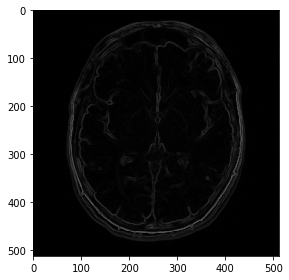
output_image = io.imread("output/final_output.png")
io.imshow(output_image)
<matplotlib.image.AxesImage at 0x7f06424b14a8>